


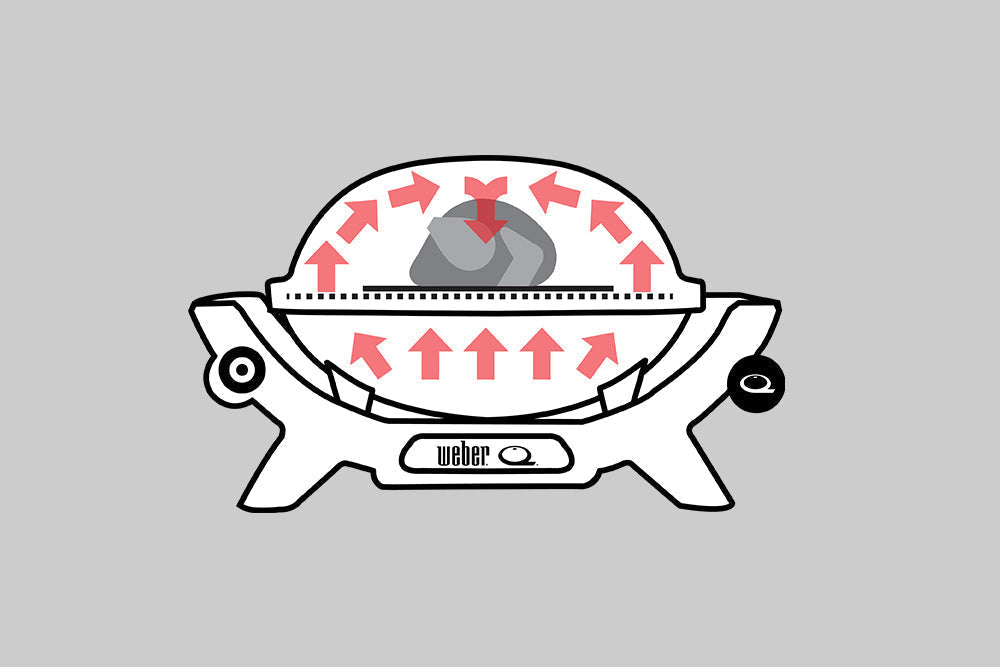
The indirect cooking method is used for roasting, baking and low and slow cooking. Food is not cooked directly over a heat source or directly on the cooking grill above a heat source.
Indirect cooking is recommended for foods that will take longer than 20 minutes to cook to completion, and they generally don’t need to be turned at all during the cooking process.
If you have a Smart Model barbecue with a Wi-Fi Enabled Digital Thermometer (QX2800N+, QX3200N+, QX3600N+ models), please refer to the bottom of this article for important information.

Roasting and baking:
Place a Weber Q Convection tray in a horizontal position in the centre of your Q cooking grill. Place a Q Roasting trivet on top of the convection tray. Light your barbecue, and pre-heat on high according to the instructions in the Quick Start Guide.
Once pre-heated, turn your Q burner control dial to the recommended cook setting appropriate to the cooking method and temperature range you’re trying to achieve. These are detailed in the Quick Start Guide for your barbecue.
- For roast meats and vegetables, we recommend placing your food directly onto the roasting trivet.
- For baking, you will need a tray or dish to place your food in/on before you put it onto the roasting trivet. The Weber Q casserole dish and frying pan are both great for baking, but a baking tray, cake tin or muffin tray are also suitable.
- For pizza making, a pizza stone should be pre-heated on top of the convection tray and roasting trivet
Place your food onto the barbecue (see above notes!), close the lid, and cook as directed in the recipe. There is no need to turn your food during cooking.
Low and slow cooking (only applicable to + models):
Place the convection tray on the far-right side of the cooking grill, in a horizontal position. Set the trivet on top of the convection tray. Place a small drip pan filled with water to the left of the convection tray and trivet, in a vertical position.
Light your Q burner and then your + burner, before turning off your Q burner, and pre-heat with the + burner on, according to the instructions in the Quick Start Guide.
Once pre-heated, place your food directly onto the roasting trivet, close the lid, and cook as directed in the recipe. There is no need to turn your food during cooking.
Weber Q+ Indirect Cooking Mode - Wi-Fi Enabled Digital Thermometer
(QX2800N+, QX3200N+, QX3600N+ models)
The Wi-Fi Enabled Digital Thermometer allows for simple monitoring of the barbecue’s ambient temperature and food temperature, both on the digital display, and remotely via the Weber Connect app.
The indirect cooking method is used for roasting, baking and low and slow cooking. In the case of the Weber Q range of barbecues, the cooking method is achieved using a convection tray and trivet, that shields and elevates food off the grill and creates room for the hot air to circulate around the food.
Using a convection tray and trivet for indirect cooking causes an inaccurate ambient temperature readout on the Wi-Fi Enabled Digital Thermometer, and in the Weber Connect App, unless Indirect Cooking mode is activated.
To activate Indirect Cooking mode:
- Ensure your barbecue is paired with your Weber Connect App
- Select your barbecue
- Set an ambient target temperature (note that setting the target temperature has no impact on the settings or temperature) – you should follow the suggested settings in the Quick Start Guide for your chosen indirect cooking method
- Switch the toggle for “Indirect Cooking”, which applies a temperature offset.
- The ambient temperature displays on the Wi-Fi Enabled Digital Thermometer and the ambient temperature readout in the Connect App, alongside the target temperature.

After each cook, the Weber Connect App will automatically reset to Direct Cooking Mode. Indirect Cooking mode needs to be applied EACH time you cook indirect with a convention tray and trivet.


